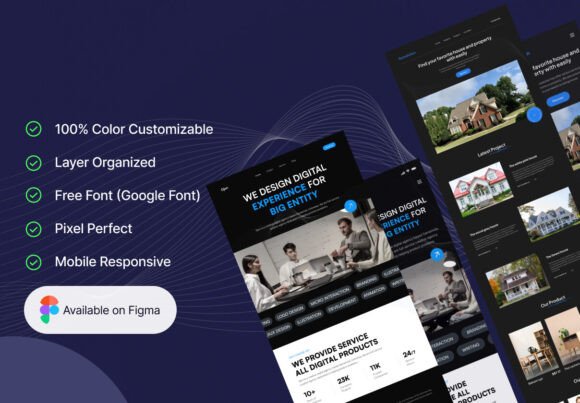
Xpage – Landing Page UI-Kit for Professionals Who Value Speed and Precision
Building a landing page that performs well visually and functionally often comes down to the resources you start with. Whether you're a freelance designer juggling multiple clients or a marketing lead trying to get a campaign out the door, the difference between a polished result and a mediocre one is often the quality of your UI kit. Xpage – Landing Page UI-Kit offers a practical, well-structured foundation for anyone who needs a professional landing page without starting from a blank canvas.
This kit delivers two complete landing page designs, each with its own concept and style, plus mobile responsive versions for both. The result is a flexible package that works across use cases—from creative digital agencies to real estate platforms. And because it is crafted entirely in Figma, editing, resizing, and customizing the design remains straightforward throughout the workflow.
What Makes Xpage – Landing Page UI-Kit Worth Your Attention
UI kits are abundant, but not all of them prioritize the practical realities of real-world design work. Xpage – Landing Page UI-Kit stands out because it treats organization and editability as core features, not afterthoughts. Every layer is named and grouped with clarity, so you are not wasting time hunting for the right element when you need to make a last-minute change before a client review.
The kit includes two distinct landing page styles. One leans toward the bold, modern aesthetic suitable for a creative digital agency. The other adopts a more polished, trust-oriented layout ideal for real estate or service-based businesses. This dual-design approach gives you flexibility without forcing you to compromise on visual consistency. Both pages come with their own mobile responsive counterparts, meaning you are not left to guess how the layout collapses on smaller screens. The responsiveness is baked in, not tacked on.
Another practical advantage is the use of vector shapes throughout the kit. Everything scales cleanly, whether you are exporting assets for a retina display or resizing an element to fit a different section. Combined with pixel-perfect alignment, the kit removes the friction of manual adjustments.
Two Distinct Landing Page Designs
Having two separate landing page concepts in one kit is more useful than it might sound. You can use one design for a primary campaign and the other for a secondary offer, or present both to a client as alternative directions. The creative digital agency layout emphasizes bold typography and vivid imagery, while the real estate concept focuses on clarity, trust signals, and structured information. Neither feels like a template retread.
Mobile Responsive Versions Included
Responsive design is no longer optional, yet many UI kits still leave mobile adaptation as an exercise for the buyer. Xpage – Landing Page UI-Kit includes two mobile responsive designs that mirror the desktop layouts. This is not a simple stacking of elements—the mobile versions have clearly been thought through with touch targets, spacing, and readability in mind.
100 Color Customization Options
Color flexibility matters when you are aligning a landing page with brand guidelines. The kit provides 100 color customizable options, which means you can shift the palette significantly without breaking the design's internal harmony. Whether you need a subdued corporate palette or something more vibrant, the structure supports it.
Figma Compatibility with Well-Organized Layers
Figma has become the standard for collaborative design work, and this kit takes full advantage of the platform. Layers are labeled logically, components are reusable, and the overall file structure lets you navigate between the two designs without confusion. If you are working with a team, the organization also helps maintain consistency across contributors.
Pixel-Perfect Precision and Open Source Fonts
Pixel-perfect alignment is one of those details that separates a professional-looking page from an amateur one. Every element in this kit aligns to a grid, so you are not fighting with misaligned buttons or uneven spacing. On top of that, the kit uses open source Google Fonts, which keeps your project free from licensing headaches and ensures consistent rendering across browsers.
Real-World Performance and Practical Value
When you evaluate a UI kit for real-world use, the question is not just whether it looks good in the preview file, but whether it holds up under the demands of an actual project. Xpage – Landing Page UI-Kit performs well in this regard because it was built with iteration in mind. The vector shapes and organized layers mean you can swap out imagery, adjust copy blocks, or restructure sections without triggering a cascade of broken elements.
For example, if you are designing a landing page for a real estate client, you can take the real estate concept, customize the color palette to match their brand, replace placeholder images with property photos, and adjust the layout for different listing types. The entire process can be completed in a few hours, not days.
Similarly, a creative agency designer can use the agency-focused layout for a campaign microsite. The bold visual style works well for portfolio showcases or event promotions. And because the mobile responsive version is already built, you are not forced to guess how the design adapts on a phone or tablet.
One limitation worth noting: because the kit includes only two landing page designs, you might need additional pages if your project requires a multi-page funnel. However, the kit's structure makes it relatively easy to extend the design language into new pages if you have a moderate comfort level with Figma.
Who Benefits Most from Xpage – Landing Page UI-Kit
This kit is well suited for a wide range of users, but certain groups will find it especially valuable.
- Freelance designers who need to deliver professional landing pages quickly will appreciate the ready-to-use structure and mobile responsiveness. The ability to customize colors extensively means you can adapt the kit for different clients without starting over.
- Marketing teams launching campaigns can use the kit to build landing pages for A/B testing or seasonal promotions. The two distinct designs give you options without requiring a full redesign cycle.
- Small business owners and entrepreneurs who handle their own web presence will find the kit accessible, especially if they already work with Figma. The organized layers make it possible to make edits without a design background.
- Educators and content creators who need a clean, professional page for course launches or digital products can also benefit from the structured approach.
If you are a seasoned designer who prefers to build everything from scratch, this kit may feel more like a starting point than a final solution. But for the majority of professionals who value efficiency without sacrificing quality, the balance is right.
Reliability and Long-Term Value
A UI kit's long-term value depends on how reusable its components are and how well it adapts to evolving project needs. Because Xpage – Landing Page UI-Kit relies on vector shapes and Google Fonts, it does not lock you into proprietary assets that might become outdated. The Figma file format also means the kit remains editable as the platform continues to evolve.
The well-organized layer structure further adds to the kit's longevity. When you return to a project months later, you will not waste time re-learning the file's architecture. Everything is labeled intuitively, which is especially helpful when handing off files to other team members.
From a presentation standpoint, the kit delivers a clean, modern aesthetic that aligns with current design trends without being trendy to the point of short relevance. The layouts emphasize content hierarchy, readability, and clear calls to action—principles that do not go out of style.
Final Considerations
Choosing a UI kit is ultimately about saving time without compromising quality. Xpage – Landing Page UI-Kit offers a practical middle ground: enough structure to accelerate your workflow, enough flexibility to accommodate brand-specific needs, and enough design quality to present confidently to clients or stakeholders. The inclusion of two distinct concepts, mobile responsive versions, and extensive color customization makes it a versatile asset for anyone who works with landing pages regularly. If you use Figma and value organized, pixel-perfect files, this kit is worth a close look.