Makeup Artist Keynote Template: A Strategic Tool for Beauty Professionals
In the beauty and makeup industry, how you present your services often matters as much as the quality of your work. Whether you are pitching to a wedding couple, negotiating a contract for a film production, or presenting your portfolio to a corporate event planner, your ability to communicate professionalism and creative vision directly impacts your bottom line. The Makeup Artist Keynote Template is a presentation tool designed specifically for makeup artists and beauty professionals who need to showcase their work, outline their services, and win more clients without spending excessive time on slide design.
This is not merely a collection of slides. It is a strategic asset that, when used thoughtfully, can elevate how you position your business, streamline your communication with clients, and reinforce your brand across multiple touchpoints. In this article, we will explore what this template offers, why it matters for your business goals, and how to use it with intention rather than as a random fill-in.
What the Makeup Artist Keynote Template Actually Delivers
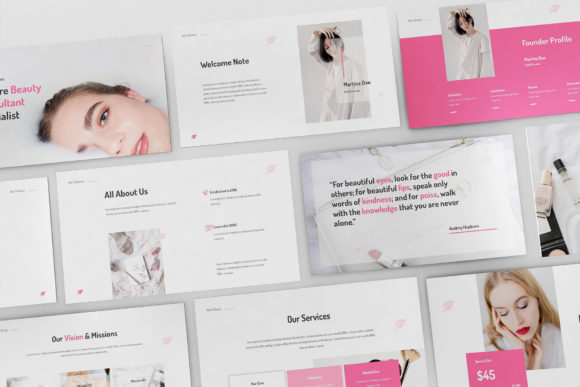
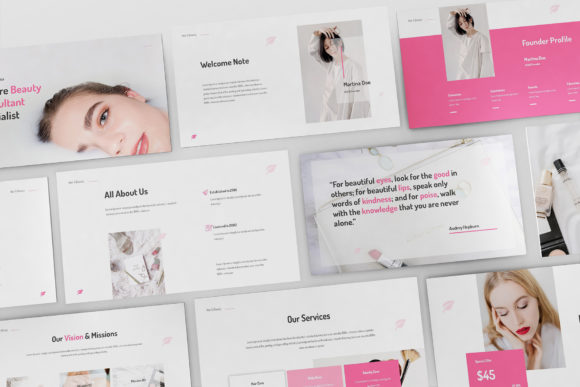
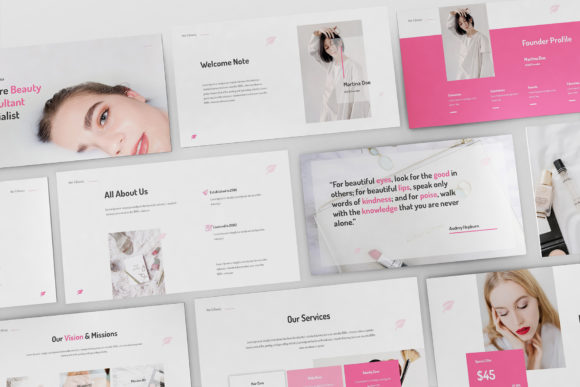
At its core, this template provides thirty unique creative slides built for Apple Keynote, available in both .key and .key09 formats. It supports two aspect ratios—standard 16:9 and widescreen—making it suitable for presentations on laptops, tablets, projectors, or even embedded in a website. The design follows a professional flat aesthetic, which means it avoids heavy gradients or overly decorative elements that can distract from your content. Instead, it focuses on clean layouts, resizable vector elements, and overlay picture effects that let your images take center stage.
What makes this template strategically useful is not the design alone, but the structure it imposes. With master slide layouts, fully animated transitions, and pixel-perfect spacing, you are guided toward a coherent narrative flow. You do not have to decide where to place your portfolio images or how to format your service menu. The template already does that. You simply insert your pictures with one click, replace placeholder text, and adjust the order to match your story.
The template also includes PDF preview documentation, free font recommendations (Dosis is suggested), and free updates. It is print-ready, meaning you can export slides as handouts or leave-behinds for clients who want to review your offerings after a meeting. For a freelancer or small business owner, this reduces the friction between having an idea for a presentation and actually delivering one that looks polished.
Why a Presentation Template Matters for Your Business Goals
Many makeup artists rely on Instagram or a simple website to attract clients. While those channels are essential, they often fail to communicate the depth of your expertise, the range of your services, or the logistical details that event planners and wedding coordinators need to make a decision. A presentation fills that gap. It allows you to control the narrative from start to finish, highlight your best work in a structured way, and address client objections before they arise.
Using the Makeup Artist Keynote Template strategically can support several business goals:
- Positioning and branding: A consistent visual identity across your slides reinforces your brand. When every slide uses the same color palette, typography, and layout structure, you appear more established and reliable. Clients subconsciously associate visual coherence with operational competence.
- Communication efficiency: Instead of answering the same questions repeatedly—what services do you offer, what are your rates, how do you handle trials—you can build a presentation that answers them all in sequence. This saves time during consultations and ensures you do not forget to mention important details.
- Customer experience: A well-designed presentation makes the client feel valued. It signals that you have prepared for their specific needs, whether they are planning a wedding, a corporate event, or a video production. This can differentiate you from competitors who simply show up with a tablet of unorganized photos.
- Long-term productivity: Once you create your master presentation, you can adapt it for different contexts. Swap out images for a bridal show, adjust the service pages for a film client, or simplify it for a quick pitch. The template becomes a reusable asset rather than a one-time effort.
Strategic Use Cases for Makeup Professionals
The practical applications of this template extend far beyond a standard portfolio review. Here are several scenarios where a structured keynote presentation can make a tangible difference in your outcomes.
Wedding Consultations and Bridal Shows
Wedding clients often book months in advance, and they are comparing multiple artists simultaneously. A presentation that walks them through your signature looks, trial process, timeline on the wedding day, and pricing tiers can help you stand out. Use the overlay picture effect to show before-and-after transformations, or dedicate a slide to testimonials from past brides. The template's vector elements allow you to add subtle icons that guide the eye through your process without overwhelming the viewer.
Film, Video, and Editorial Pitches
Directors and producers care about your ability to work under pressure and adapt to different lighting conditions. Your presentation can include side-by-side comparisons of looks created for natural light, studio setups, or outdoor shoots. The widescreen aspect ratio is particularly useful here because it mirrors the cinematic framing that filmmakers are accustomed to. You can also include a slide about your kit, your availability for travel, and your experience on set, all formatted consistently.
Corporate and Event Beauty Services
Corporate event planners often need to book multiple artists for large groups, such as fashion shows, galas, or product launches. A presentation that clearly outlines your capacity, your team (if applicable), and your hygiene protocols can make the difference between being considered and being overlooked. The template's master slides allow you to create a uniform look for each section, so the planner can quickly scan through your capabilities.
Classroom or Workshop Teaching
If you teach makeup classes or offer workshops, this template can serve as your lesson structure. Use the animated slides to reveal steps in a demo one at a time, or to compare different techniques. The documentation included in the template can help you plan your session flow before you even open Keynote.
How to Approach the Template with Intentionality
Downloading a template is only the first step. The real value emerges when you use it as a framework for strategic thinking rather than a decoration tool. Before you insert a single image, take time to clarify what you want the presentation to achieve. Are you trying to close a specific contract? Are you building a general portfolio to send to inquiries? Are you preparing for a trade show where attendees will flip through slides on a screen?
Your answers will determine which slides to include, which to omit, and how to order them. The template gives you thirty slides, but you do not need to use all of them. A focused ten-slide presentation often outperforms a scattered thirty-slide one. Be ruthless about removing anything that does not directly support your goal.
When selecting images for the overlay picture effect, prioritize quality over quantity. One stunning high-resolution image of a bridal look will communicate more than five mediocre ones. The template is Retina and Full HD ready, so use images that match that resolution. Blurry or pixelated photos will undermine the professional impression you are trying to build.
Pay attention to the free font provided—Dosis. It is a clean, modern sans-serif typeface that works well for headlines and body text. But if Dosis does not match your brand personality, feel free to substitute it with another font. The template's vector elements are resizable and editable, so you can adjust typography without breaking the layout.
Practical Planning Tips Before You Build
Start by outlining your narrative arc. A typical presentation for a makeup artist might follow this structure:
- Introduction: Who you are and what you specialize in
- Philosophy: Your approach to beauty and client collaboration
- Portfolio: A curated selection of your best work, organized by category
- Services: What you offer, with clear descriptions and pricing
- Process: How you work from consultation to final touch-up
- Testimonials: Social proof from past clients
- Call to action: The next step you want the viewer to take
Within each section, use the template's master slides to maintain visual consistency. For example, keep all portfolio slides in the same layout so the viewer's eye does not have to reorient. Use the animated slides sparingly—perhaps for reveal moments like before-and-after transitions—but avoid animating every slide, which can feel gimmicky.
Consider your delivery context. If you will be presenting in person on a laptop, the 16:9 aspect ratio works well. If you plan to send the file as a PDF or view it on a tablet, test how it looks in both formats. The template includes both aspect ratios, so you can choose the one that fits your typical presentation environment.
Risks of Using the Template Without Clear Goals
It is worth acknowledging that any tool can be misused. The most common mistake with this template is treating it as a slide generator rather than a communication framework. If you simply drop in images and text without considering your audience or your objective, the result will look generic. Clients can tell when a presentation has not been tailored to them.
Another risk is overloading slides with content. Just because the template offers space for text does not mean you should fill it. Keep your copy concise. Use bullet points or short phrases rather than paragraphs. Your slides should support your spoken presentation, not repeat it verbatim.
There is also a risk of relying too heavily on the template's built-in animations. While the fully animated slides can add a polished feel, excessive motion can distract or even annoy a viewer who is trying to focus on your work. Use animation to guide attention, not to show off the software.
Finally, remember that the template does not include images. You are responsible for supplying your own photography. Using stock images or low-quality screenshots will undermine the authenticity of your presentation. Invest in professional photos of your work, or at least curate your best images with care.
Long-Term Value and Iteration
The Makeup Artist Keynote Template is not a one-time purchase you use once and forget. Its real value compounds over time as you iterate on it. After your first presentation, review what worked and what did not. Did a particular slide confuse clients? Did you need more portfolio examples? Did the pricing section generate questions you could have addressed upfront?
Update the template accordingly. Swap out older images for newer work. Adjust your service descriptions as your offerings evolve. If you expand into bridal, film, and editorial, create separate slide decks from the same template base, each tailored to that audience. The master slide layouts make it easy to maintain consistency even as you branch into different verticals.
Because the template includes free updates, you will also benefit from any refinements the creator makes over time. This reduces the risk of your presentation becoming outdated as Keynote itself evolves.
Decision-Making Guidance for Entrepreneurs and Freelancers
If you are a solo makeup artist debating whether to invest in a structured presentation tool, consider your current conversion process. How often do you lose potential clients because you could not clearly communicate your value? How much time do you spend answering repetitive questions? If the answer is more than a few hours per month, this template can pay for itself in time saved and deals closed.
If you run a beauty agency or manage a team of artists, the template becomes even more valuable. You can standardize your team's presentations, ensuring every artist presents the same brand image. The print-ready feature also allows you to create physical leave-behinds for events and trade shows, which can reinforce your brand long after the conversation ends.
For educators and workshop leaders, the template offers a structured way to present curriculum. Instead of building slides from scratch for each class, you can start from the template and adapt it to the specific techniques or products you are teaching.
Whatever your role, the key is to use this tool as part of a broader strategy for communication and branding. It is not a magic solution that will instantly bring you clients, but it is a reliable framework that can help you present your work in the best possible light, save you time, and reduce the friction between you and your next booking.
Final Thoughts on Using This Template Strategically
The Makeup Artist Keynote Template is designed to remove the burden of design from your presentation process, allowing you to focus on what actually matters: your content, your message, and your connection with the client. By using it with clear goals, thoughtful planning, and a willingness to iterate, you can turn a simple slide deck into a powerful tool for growth.
Do not let the template do the thinking for you. Instead, let it free up your mental energy so you can prepare your speech, rehearse your delivery, and refine your storytelling. That is where the real competitive advantage lies. The template handles the formatting. You handle the persuasion.