White Pixel 3D Text Effect: Giving Your Words Depth That Actually Works
You know that moment when you stare at a plain headline and just know it needs something more? Maybe it’s for a podcast cover, a social media post, or even a client pitch. Words alone carry meaning, but sometimes they need visual weight to land the way you intend. That’s exactly where the White Pixel 3D Text Effect comes in. It’s not about adding clutter or noise. It’s about giving your text a clean, dimensional presence that feels both modern and natural.
This effect lives in that sweet spot between minimal and bold. The white pixel aesthetic keeps things crisp, while the 3D depth adds just enough texture to make your message pop without screaming for attention. If you’ve ever wanted your words to look like they belong on a premium product label, a tech brand’s homepage, or a creative portfolio header, this style is worth your time.
What White Pixel 3D Text Effect Actually Does for Your Work
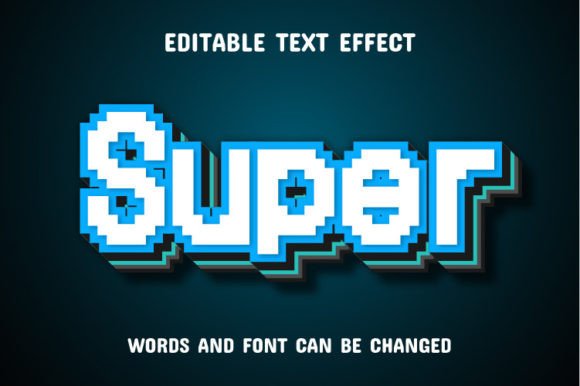
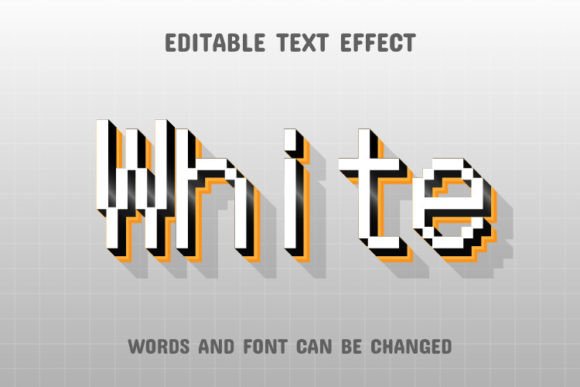
Let’s cut through the jargon. This effect takes your text and applies a three-dimensional pixel-inspired treatment. The result? Letters that feel like they’re constructed from tiny blocks or cubes, giving them a layered, almost architectural look. The white color palette keeps it versatile, so it works across dark backgrounds, vibrant images, or even subtle gradients.
The effect is fully editable, which means you can take the base design and tweak it to match your specific vibe. Want a softer shadow? Done. Prefer sharper edges? That’s a slider move away. The files come as EPS formats, compatible with Adobe Illustrator CC and higher, plus JPG previews so you can see exactly what you’re working with before diving into edits.
This isn’t a locked template where you’re stuck with someone else’s choices. You type your words, and the effect wraps around them like a custom fit. It’s as close to plug-and-play as you can get while still having full creative control.
Where This Effect Fits Into Real Projects
The beauty of the White Pixel 3D Text Effect is that it doesn’t belong to one niche. It works across a range of real-world scenarios, and that’s what makes it such a useful tool to have in your back pocket.
Social Media Content That Actually Stops the Scroll
If you’re managing Instagram stories, TikTok thumbnails, or LinkedIn banners, you know that text is often the first thing people see. A flat white font on a busy background gets lost. But a 3D pixel treatment? That catches the eye. Imagine a motivational quote layered over a dark gradient, or a product name hovering above a lifestyle photo. The depth gives the text its own visual plane, so it stands apart from the image behind it.
I’ve seen freelancers use this effect for their brand story highlights, and it instantly made their profiles feel more polished. No need for complex animation or video editing. Just a clean, dimensional headline that does the heavy lifting.
Blog Headers and Featured Images
Bloggers and content creators often spend more time on the featured image than the post itself. With this effect, you can generate a strong, readable title graphic in minutes. The white pixel style pairs well with muted background photos, abstract textures, or even solid colors. It gives your blog a consistent, professional look without requiring a design degree.
A food blogger I know used a variation of this effect for her seasonal recipe titles. The 3D text sat over a blurred kitchen background, and the result looked like something from a premium cooking magazine. She told me it took her less than ten minutes to set up once she had the EPS file open in Illustrator.
Product Packaging and Mockups
Small business owners and product creators often need mockups before they commit to printing. The White Pixel 3D Text Effect works surprisingly well for product labels, especially for items like skincare bottles, candle jars, or tech accessories. The pixel-like structure gives the text a tactile feel, which translates nicely into physical packaging concepts.
You can drop your product name into the effect, adjust the depth and angle, and place it on a mockup template. Suddenly, your idea feels real. Clients and stakeholders can visualize the final product without guessing. That’s a huge advantage when you’re pitching a new line or testing a concept.
Course Graphics and Educational Materials
Educators and online course creators need clear, engaging visuals that don’t distract from the content. The White Pixel 3D Text Effect works well for module titles, section headers, or even certificate designs. The clean white aesthetic keeps things professional, while the 3D treatment adds a modern touch that students associate with quality.
I’ve seen this used in a digital marketing course where each module had its own 3D pixel title slide. The consistency across the course made the whole program feel cohesive, and the instructor mentioned that students often commented on the polished look of the materials.
Personal Branding and Portfolio Headers
If you’re a freelancer, designer, or creative professional, your portfolio site is your digital storefront. A strong headline with the White Pixel 3D Text Effect can set the tone for your entire brand. It says you pay attention to detail and that you value both aesthetics and readability.
One freelance illustrator I follow uses this effect for her name at the top of her portfolio. The white pixel text sits over a dark abstract background, and it’s the first thing visitors see. She told me that several clients mentioned the header as one of the reasons they reached out. It sounds small, but first impressions matter.
Who Benefits Most from This Effect
Honestly, anyone who works with text in a visual context can find a use for this. But certain groups tend to get more mileage out of it.
Freelancers and solo creatives often wear many hats. They need design solutions that deliver results without requiring hours of tweaking. The EPS file format means you can open it in Illustrator, edit the text, and have a finished graphic in the time it takes to brew a coffee.
Small business owners who handle their own marketing will appreciate how quickly they can generate consistent branded content. Whether it’s a sale announcement, a new product launch, or a simple thank-you post, the effect gives everything a cohesive look.
Marketers and social media managers working with tight deadlines will find this useful for creating thumbnails, ad creatives, and banner text. The 3D pixel treatment stands out in crowded feeds, and since it’s fully editable, you can adjust the color, size, and angle to fit different platforms.
Educators and course creators who want their materials to look professional without hiring a designer will also benefit. The effect is clean enough for academic use but modern enough to keep younger learners engaged.
What to Consider Before Using It
Like any design tool, the White Pixel 3D Text Effect works best when you use it intentionally. Here are a few things to keep in mind.
First, the effect relies on contrast. White text needs a background that allows it to stand out. Dark or muted backgrounds work beautifully, but if you’re placing it over a bright or busy image, you may need to adjust the opacity or add a subtle shadow layer. The EPS file gives you full control over these variables, so experimentation is easy.
Second, think about readability. The 3D pixel effect is eye-catching, but if your text is too long or the font size is too small, the depth can overwhelm the message. Short headlines, single words, or short phrases perform best. Think titles, names, or calls to action rather than full paragraphs.
Third, consider your brand voice. The white pixel aesthetic leans modern and slightly tech-forward. It suits brands that want to feel current, clean, and approachable. If your brand is more rustic, vintage, or handcrafted, you might need to pair it with textures or warm tones to balance the look.
Finally, software compatibility matters. The files are designed for Adobe Illustrator CC or higher. If you’re using another vector program, double-check that it supports EPS files with editable layers. The JPG preview files are included so you can see the final look without opening the software, but real editing happens in Illustrator.
Creative Ways to Make It Your Own
The real power of this effect is that it’s a starting point, not a final destination. You can take the base pixel 3D treatment and layer in your own touches. Try pairing it with a subtle gradient behind the letters, or experiment with different angles for the 3D extrusion. You can even combine multiple effects for a more complex look.
One designer I know uses the effect as a base, then adds a faint shadow and a slight color tint to the pixel blocks. The result looks like glowing 3D text, perfect for gaming channels or tech content. Another creator uses it in black and white for a high-contrast editorial feel.
The point is, you’re not stuck with default settings. The 100% editable nature means you can adjust almost every aspect. Font size, depth, angle, color, spacing. It’s all there for you to tweak until it feels right.
Why This Effect Works for So Many People
At its core, the White Pixel 3D Text Effect solves a common problem. You have a message, and you need it to be seen. You don’t want it to blend in, but you also don’t want it to look overdone or gimmicky. This effect hits a balance that’s hard to find in other text treatments.
The pixel structure gives it a subtle texture that feels contemporary without being trendy. The 3D depth adds weight and presence without making the text hard to read. And the white color keeps everything versatile enough to fit into almost any project.
Whether you’re building a brand from scratch, refreshing an existing one, or just need a quick headline that looks like it took hours to craft, this effect delivers. It’s one of those tools that quietly makes everything around it look better, and that’s exactly what good design should do.
If you’ve been looking for a way to give your words more presence without overcomplicating your workflow, the White Pixel 3D Text Effect is worth adding to your toolkit. Open the EPS file, type your message, and see how a little depth can make all the difference.