Website Design PowerPoint Template for Creative Agencies
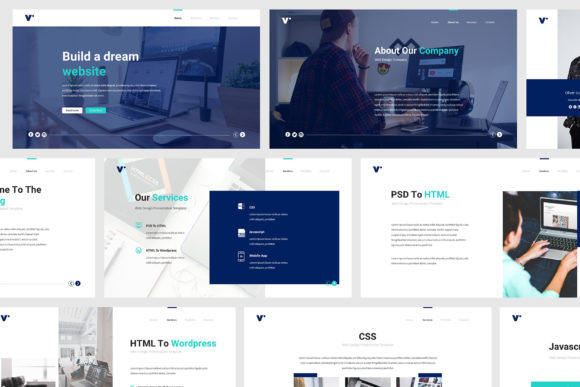
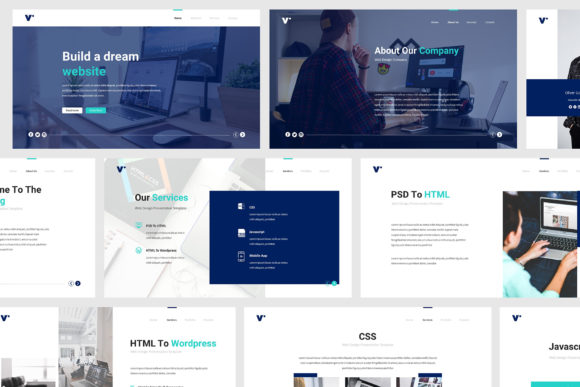
A presentation is often the first impression a creative agency makes. Whether you are pitching a new client, presenting a portfolio, or sharing your annual strategy, the way you communicate visually matters as much as the words you say. The Website Design PowerPoint Template is a presentation kit built specifically for web design and creative agencies. It offers a clean, modern, and minimalist design that helps you focus on your message without getting lost in formatting details.
Why a Specialised Template Matters for Your Agency
Many professionals rely on generic presentation themes that are either too flashy or too plain. A web design agency, however, has distinct needs. You need to demonstrate your design sensibility, showcase work beautifully, and maintain brand consistency across every slide. The Website Design PowerPoint Template addresses these needs directly. Its flat design and classic, minimalist aesthetic give your presentation a polished look without overwhelming the content.
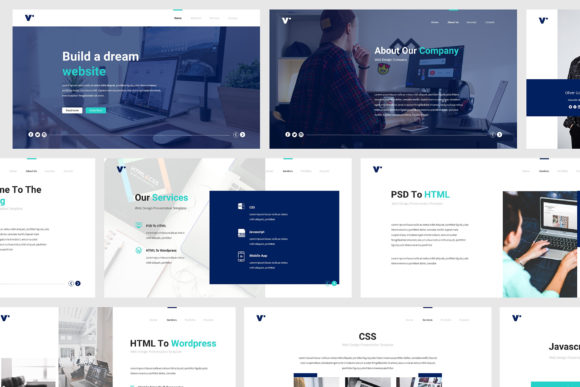
Using a purpose-built template also saves hours of work. Instead of starting from scratch, you get 30 unique creative slides that cover the most common sections of an agency presentation: introduction, services, portfolio, team, testimonials, process, pricing, and more. This structure frees you to invest your time where it truly matters—crafting your speech, refining your case studies, and rehearsing your delivery.
Key Benefits That Go Beyond Looks
When you download the Website Design PowerPoint Template, you are not just getting a set of decorative slides. The template includes practical features that directly improve your workflow and presentation quality.
Quick Picture Insertion with Overlay Effects
One of the most time-consuming tasks in presentation design is placing images and making them look cohesive. This template lets you insert pictures with a single click, and the overlay picture effect ensures that every image blends seamlessly with the overall design. For a web design agency, this is particularly valuable when showcasing screenshots, mockups, or client logos. You avoid awkward colour mismatches and keep the focus on the work itself.
All the Formats You Need
You receive both PPTX and PPT files, so you can work in newer or older versions of PowerPoint. The template is also Retina and Full HD ready, meaning your slides will look crisp on any modern screen. Two aspect ratios are available—standard 16:9 and widescreen—so you can choose the best fit for your projector or monitor. This flexibility reduces last-minute format adjustments.
Fully Animated Slides That Stay Professional
Animations can be tricky. Too much movement distracts the audience; too little feels static. The Website Design PowerPoint Template includes fully animated slides that are subtle and purposeful. Transitions and entrances are smooth, helping you guide attention without overdoing it. You can also remove or modify animations easily if you prefer a quieter presentation style.
Who Benefits Most from This Template
While the template is marketed toward web design agencies, its audience is broader. The following professionals will find it especially useful:
- Design agency owners who need a consistent tool for client pitches and investor meetings.
- Freelance web designers looking for a professional presentation without spending days on design.
- Creative directors who want to align their team’s presentation style with the agency’s brand guidelines.
- Marketers and brand strategists who present digital campaigns and need a clean, modern backdrop for data and visuals.
- Consultants and educators in the design field who teach or train using slide decks that should look current and credible.
The clean, minimalist layout also works well for technology startups, product teams, and even photographers or videographers who want a no-nonsense portfolio presentation. However, if your brand relies on very bold, experimental, or highly decorative visuals, you might want to test how the flat design aligns with your style.
Practical Use Cases in Everyday Agency Work
Imagine you are preparing a pitch for a new website redesign project. You have a tight deadline and need to present your approach, past work, and team expertise. With the Website Design PowerPoint Template, you can open the file, replace placeholder content with your own, and have a cohesive deck ready in under an hour. The resizable vector elements—icons, lines, shapes—scale without pixelation, so your slides look consistent whether viewed on a laptop or a large screen.
For internal team meetings, the template supports faster alignment. You can maintain the same layout across multiple presentations, reinforcing your agency’s visual identity each time. The layouts are based on master slides, so any change you make to the master updates all related slides automatically. This is a huge time-saver when you need to rebrand or adjust colours for a specific client.
The template is also print-ready. If you need to provide handouts or leave-behinds after a meeting, the slides export cleanly to PDF. The preview PDF that comes with the download helps you see the full design before you start editing, so you can plan your content accordingly.
What to Keep in Mind
No template is a complete solution. The Website Design PowerPoint Template provides a strong foundation, but you still need to invest effort in your content. The images included are placeholders, not final photos—you will need to supply your own visuals. Also, while the template is fully editable, basic familiarity with PowerPoint (or compatible software) is assumed. If you are new to slide design, the documentation and free font links included in the package will help you get started.
Another consideration is fit for extremely large or complex presentations. With 30 slides, the template covers most agency needs, but for a very long deck you may need to duplicate slides or create additional ones. The master slides make that straightforward, but it is good to know the scope before you commit.
Recommendations for Getting the Most Out of It
To maximise the template’s value, start by planning your presentation narrative. Use the slide structure as a guide, not a cage. You can reorder, hide, or duplicate slides as needed. Take advantage of the overlay picture effect to create consistent-looking hero images across your deck. Also, don’t skip the free updates—the template is supported, so you can return for improved versions or compatibility fixes.
If you work with a team, consider sharing the template file on a common drive. That way everyone uses the same version, and your agency’s presentations maintain a unified look. For client-facing decks, pay extra attention to the first three slides: the title, introduction, and problem statement. These set the tone for the entire presentation, and the minimalist design helps you land your message cleanly.
Final Thoughts
The Website Design PowerPoint Template is a practical tool for anyone who regularly presents on behalf of a creative agency. It balances modern aesthetics with functional efficiency, giving you a head start on design while leaving room for your unique content. By reducing the time spent on slide creation, it allows you to focus on what truly makes a presentation memorable: your ideas, your expertise, and your connection with the audience.
Whether you are a solo freelancer or part of a growing agency, having a reliable, professional template in your toolkit can make a real difference in how your work is perceived. Try it out for your next pitch, and see how a structured, clean presentation can support your creative vision.