Evaluating the Website Design Keynote Template for Agency Presentations
When preparing a presentation for a creative agency or web design business, the visual quality and professional polish of your slides can influence how your audience perceives your brand. The Website Design Keynote Template is a presentation package designed specifically for this context, offering a structured way to showcase agency work without starting from a blank canvas. This article provides an objective evaluation of the template, helping you decide whether it aligns with your presentation needs and business goals.
What the Template Provides
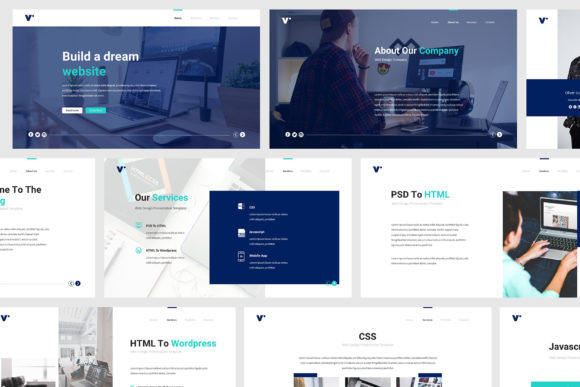
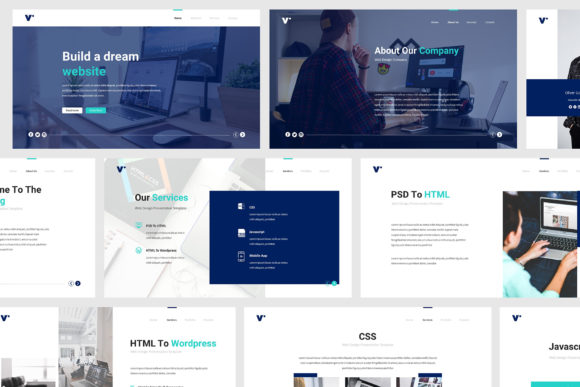
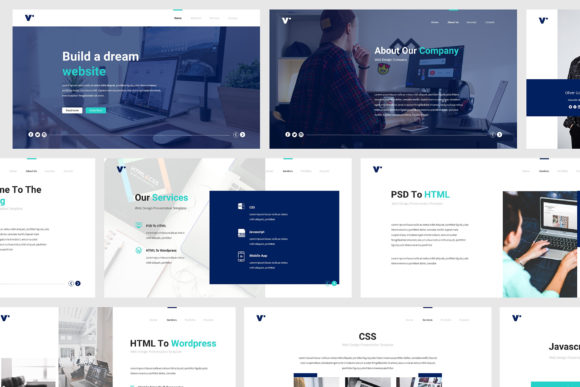
The Website Design Keynote Template is a pre-built set of slides created for Apple’s Keynote application. It is marketed toward web design agencies and creative professionals who need a clean, modern, and flat-design aesthetic. The package includes 30 unique slide layouts, each built around a minimalist and classic visual style. The slides are fully animated and based on master slide layouts, which allows for consistent formatting across your presentation with minimal manual adjustments.
Key specifications include retina and Full HD resolution support, compatibility with Keynote .key and .key09 formats, and two aspect ratio options: standard 16:9 and widescreen. The template also includes resizable vector elements, an overlay picture effect for images, and object placeholders that simplify inserting your own content. Documentation and a PDF preview are provided, and the design uses free fonts, which removes the need for additional font purchases. The template is described as print-ready and pixel-perfect, with progressive design elements that maintain visual coherence.
Who Might Benefit Most
This template is particularly well-suited for professionals who need to produce a polished presentation quickly. If you run a small to medium-sized creative agency or work as an independent freelancer, the Website Design Keynote Template can save significant time compared to designing slides from scratch. The inclusion of animated transitions and overlay effects gives presentations a dynamic feel without requiring advanced design skills.
The template also works well for those who prioritize content preparation over visual formatting. Because the layout structure is already defined, you can focus on writing your speech and organizing your ideas rather than worrying about slide composition. For pitch meetings, client presentations, or portfolio showcases, the modern and flat design language communicates professionalism and clarity.
Another strong fit is for teams that use Keynote as their primary presentation tool and need a consistent brand template. Since the design is based on master slides, updates to colors, fonts, or logos can be applied globally, ensuring brand alignment across multiple presentations. The resizable vector elements also allow for easy adjustments without losing image quality.
Considerations and Tradeoffs
While the template offers many practical benefits, there are several considerations to weigh before committing to it. One of the primary tradeoffs is the lack of uniqueness. Since the template is a pre-built design, other agencies may also purchase and use the same layouts. If brand differentiation is a high priority, you may need to customize the template heavily to ensure your presentation does not look generic.
Another consideration is that the template does not include images. All pictures shown in the preview are for demonstration purposes only. You will need to source your own photographs, icons, or illustrations to populate the placeholders. This adds an extra step to your workflow, and the quality of your final presentation will depend partly on the images you select.
The template is designed exclusively for Keynote, which limits its accessibility if your team or clients use other presentation software such as Microsoft PowerPoint, Google Slides, or Canva. While you can export Keynote files to other formats, some animations, fonts, or layout elements may not transfer cleanly. If cross-platform compatibility is important, you may need to consider a more universal solution.
Additionally, the learning curve for working with master slides and animation settings in Keynote can be non-trivial for users who are not familiar with the software. Although the template is described as easy to edit, some advanced features like overlay effects and animated elements may require initial time investment to understand and adjust properly.
When Alternatives May Be Worth Considering
Depending on your specific needs, the Website Design Keynote Template may not be the optimal choice. If you require a highly customized brand experience with unique illustrations, custom typography, or a distinctive color palette, a custom-designed presentation from a professional designer would offer more control and differentiation. Similarly, if your presentation will be delivered primarily through PowerPoint or Google Slides, you might benefit more from a template designed specifically for those platforms to avoid compatibility issues.
For teams that need to collaborate in real time or integrate presentations with cloud-based workflows, web-based tools like Canva or Google Slides provide built-in collaboration features and broader sharing options. These platforms also offer template libraries, though the design depth and animation capabilities may not match what Keynote provides.
If your presentation budget is very limited, free templates are available online for Keynote as well. However, they often lack the polished animation, master slide consistency, and print-ready formatting that this paid template includes. Evaluating the cost against the time saved and the level of professionalism required can help you decide whether a paid template is justified.
Practical Decision-Making Insights
To determine whether the Website Design Keynote Template aligns with your goals, start by assessing your presentation’s context and constraints. Consider the following factors:
- Time available: If you have a tight deadline and need a polished presentation quickly, a pre-built template saves hours of design work. If you have more time and need a distinct visual identity, custom design may be worth the investment.
- Audience expectations: For client pitches or investor meetings, a professional and clean design can enhance credibility. For internal team meetings or casual updates, a simpler approach may suffice.
- Brand consistency: If you plan to use the template repeatedly for multiple presentations, the master slide approach ensures consistency. Customize the template once and reuse it with confidence.
- Technical environment: Confirm that all stakeholders use Keynote or that you are comfortable exporting to a compatible format. Test the export process with sample slides before building your final presentation.
- Visual assets: Plan for the time needed to source or create images that match the template’s style. The overlay effect works best with high-quality photos that have good contrast and composition.
Also, consider the balance between aesthetics and functionality. The template’s flat design and modern look are well-suited for web design portfolios and agency overviews. However, if your presentation relies heavily on data visualization, complex diagrams, or detailed infographics, you may need to supplement the template with custom charts or third-party tools. The included vector elements are resizable, but the template does not come with extensive chart widgets or data-specific layouts.
Conclusion
The Website Design Keynote Template offers a practical solution for creative agencies and freelancers who need a professional, ready-to-use presentation structure. Its 30 slides, animation effects, and master slide consistency reduce the time and effort required to produce a polished keynote. At the same time, the lack of included images, Keynote-only compatibility, and potential for generic appearance are important tradeoffs to consider.
For those who value speed, simplicity, and a clean aesthetic, this template can serve as a reliable foundation. For those who prioritize brand uniqueness, cross-platform flexibility, or data-heavy content, exploring custom design or alternative platforms may be better suited. By evaluating your specific presentation goals, technical environment, and resource constraints, you can make an informed decision about whether the Website Design Keynote Template meets your needs or whether another approach would serve you better.