Minimalist Business Plan Presentation That Communicates Clearly
When you prepare a business presentation, the design of your slides can either support your message or compete with it. A cluttered layout, mismatched fonts, or overly complex graphics often distract viewers from the ideas you want to convey. The Minimalist Business Plan Presentation offers a clean alternative: a template built around simplicity, readability, and purposeful design. Whether you are pitching to investors, reporting quarterly results, or leading a team meeting, this template helps you present your content without visual noise.
What Makes This Template Stand Out
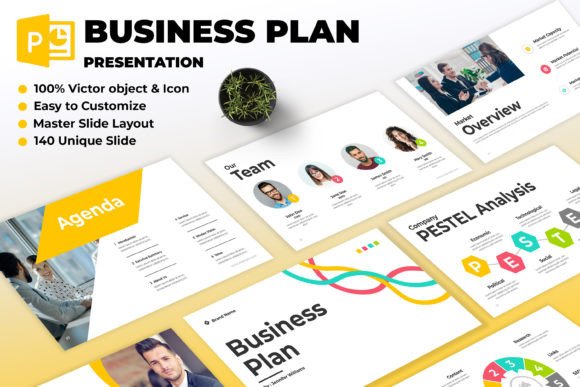
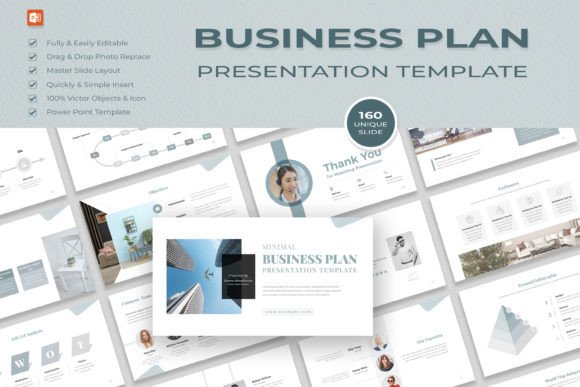
The Minimalist Business Plan Presentation is not just another slide deck. It is a thoughtfully crafted set of 160 unique slides designed around the principle that less is more. Each slide features sleek typography, subtle color accents, and generous white space. This approach ensures that your audience focuses on your data, your story, and your key points—not on decorative elements that add little value.
The template uses master slide layouts, which means you can maintain consistency across your entire presentation with minimal effort. Drop and drag photo replacement makes it simple to add your own images without disrupting the overall design. Everything is fully editable, giving you control over every element, from text and colors to icons and charts.
Because the template is available in both PowerPoint PPTX and Illustrator EPS formats, you can work in the software you are most comfortable with. The file also includes a help documentation and links to the free fonts used, so you can start editing right away. And since it is an instant download, you do not have to wait—your files are available immediately after purchase.
Why Simplicity Matters in Business Presentations
In a professional setting, your presentation design directly affects how your audience perceives your message. Research in cognitive psychology shows that people process information more effectively when visual clutter is minimized. A minimalist design reduces cognitive load, allowing viewers to absorb and retain key points more easily. The Minimalist Business Plan Presentation applies this principle directly. By stripping away unnecessary graphics and relying on clean layouts, it helps your audience stay engaged with what you are saying, not what is flashing behind you.
This is especially important during pitches or funding rounds, where you have a limited window to capture attention. Investors and decision-makers see dozens of presentations. A clean, professional design signals that you respect their time and that you have organized your thoughts clearly. It also makes your data visualizations—charts, graphs, and tables—easier to read and interpret.
Practical Benefits for Different Professionals
The Minimalist Business Plan Presentation is versatile enough to serve a wide range of users. Here are a few scenarios where it can make a noticeable difference:
Entrepreneurs and Startup Founders
When you are seeking investment or partnerships, your pitch deck needs to be concise and visually coherent. With this template, you can quickly build slides that highlight your value proposition, market opportunity, business model, and traction. The clean design ensures that your content—not your design choices—remains the focus. You can also customize the color accents to match your brand identity without overcomplicating the layout.
Marketing and Communications Professionals
For internal reports, client proposals, or strategy overviews, a minimalist presentation communicates professionalism and attention to detail. The template includes slide layouts specifically designed for introducing key concepts, visualizing data, and incorporating impactful imagery. You can present campaign results, analytics, or competitive analyses without overwhelming your audience with too much information at once.
Consultants and Advisors
If you regularly deliver insights or recommendations to clients, your slides need to be clear and trustworthy. The Minimalist Business Plan Presentation helps you structure your arguments logically. The ample white space gives you room to add annotations, callouts, or notes without making slides feel crowded. This makes it easier for clients to follow your reasoning and make informed decisions.
Educators and Trainers
Teaching complex topics often requires breaking down information into digestible pieces. The template’s streamlined layouts allow you to present one idea per slide, reducing the risk of cognitive overload. You can replace placeholder images with relevant visuals that reinforce learning objectives, and the consistent design keeps the presentation looking polished across multiple sessions.
Freelancers and Solopreneurs
When you work independently, you may not have a design team to refine your materials. A ready-made template like this one saves you time and ensures your presentations look professional even if you have limited design experience. The drag-and-drop functionality and editable master slides mean you can produce a high-quality deck in a fraction of the time it would take to build from scratch.
Realistic Use Cases and Workflow Integration
The Minimalist Business Plan Presentation fits into everyday workflows without requiring a steep learning curve. Most users can open the PPTX file, replace placeholder text with their own content, and have a finished presentation within an hour or two. The template uses a 16:9 full HD resolution (1920×1080 pixels), which looks crisp on modern screens, projectors, and video conferencing platforms.
One practical recommendation: start by reviewing the master slides to understand the available layouts. Identify which ones best match the sections of your presentation—introduction, problem statement, solution, market size, competitive landscape, financials, team, and call to action. Then customize the color accents to align with your brand or the tone of your message. Because the template uses a free font, you do not need to worry about licensing issues when sharing files with collaborators or clients.
Another thoughtful observation: the minimalist design works especially well when your slides will be shared digitally. Many viewers will read your presentation on a laptop, tablet, or phone. Small text or busy backgrounds become difficult to read on smaller screens. The generous white space and clean typography in this template ensure that your content remains legible across devices.
Who Benefits Most and Why
While the Minimalist Business Plan Presentation is useful for a broad audience, it is particularly valuable for professionals who need to communicate complex information with clarity and credibility. If you often find yourself struggling to condense your message into a few slides, this template can help by providing natural constraints. The layouts encourage you to focus on one idea per slide, which leads to stronger presentations overall.
It is also an excellent choice for non-designers who want a professional-looking deck without hiring a graphic designer. The template handles the visual foundation, leaving you to focus on content and storytelling. And for experienced presenters, the customizable elements give you enough flexibility to inject your personal style without breaking the design system.
That said, the minimalist approach may not suit every situation. If your brand identity relies on vibrant, highly customized visuals or if you need to include extensive technical diagrams on a single slide, you may need to supplement the template with additional graphics. The template is designed for clarity and simplicity, so if your presentation requires dense layered visuals, you might need to adapt the layouts or combine them with other tools. In such cases, it is worth comparing this template with other options that offer more complex visualization capabilities.
Thoughtful Observations on Design and Engagement
A clean design does more than look good—it actively supports audience engagement. When slides are visually quiet, viewers can process your spoken words and written content simultaneously without splitting their attention. This is especially important in virtual meetings, where distractions are already abundant. The Minimalist Business Plan Presentation helps you hold attention by reducing unnecessary stimuli.
Another often-overlooked benefit is that a minimalist template makes it easier to iterate. If you need to update your presentation for a different audience or add new data, you can do so without redesigning everything. The consistency of the master slides means that changes propagate automatically. Over time, this saves hours of rework.
The template also encourages better storytelling. With fewer visual elements competing for attention, you can focus on narrative flow. Each slide becomes a distinct scene in your story, and the white space acts as a visual pause that gives your audience time to absorb information before moving to the next point. This pacing is hard to achieve with busier designs.
Final Considerations and Fit
The Minimalist Business Plan Presentation is a practical tool for anyone who wants to communicate professionally without visual clutter. It works well for pitches, reports, internal updates, and client meetings. The 160 unique slides give you plenty of variety, while the master slide system ensures consistency. The inclusion of both PowerPoint and Illustrator files means you can edit on your preferred platform, and the instant download gets you started immediately.
As with any template, the best results come from thoughtful customization. Take time to choose images that support your message, edit text to be concise, and use color accents sparingly to highlight key points. If you approach the template as a framework rather than a fixed design, you will get the most value from it.
For professionals who value clarity, efficiency, and refined aesthetics, this template offers a reliable foundation. It may not replace the need for custom design work in specific cases, but for the vast majority of business presentations, it provides everything you need to create a polished, focused, and effective deck.