Furniture Powerpoint Presentation for Effective Marketing
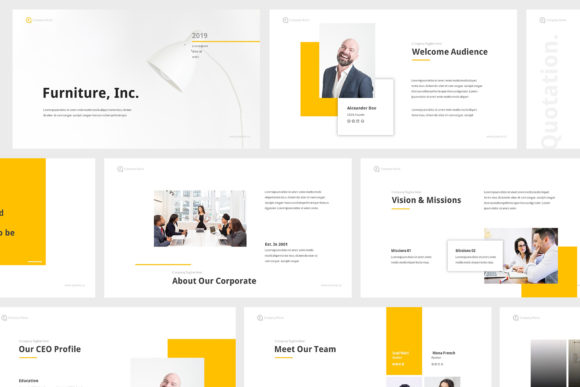
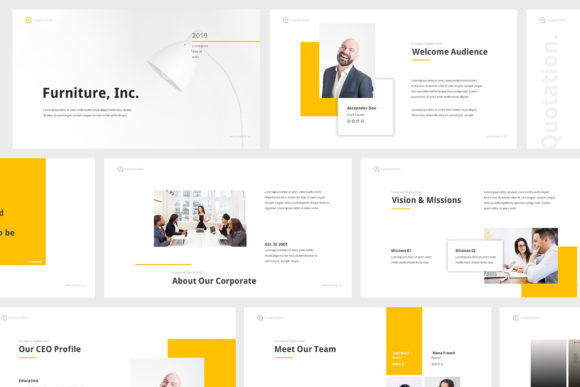
When you need to present furniture designs, store promotions, or interior concepts, the right presentation tool makes all the difference. The Furniture Powerpoint Presentation is a specialized template designed for interior design, furniture store marketing, and promotion campaigns. It combines professional aesthetics with flat design elements to help you deliver a polished message without investing hours in design work. This template is built to save time while providing a consistent, modern look that resonates with clients and audiences.
Unlike generic slide decks, this presentation focuses on the visual language of furniture and interior spaces. Every slide is crafted with clean layouts, resizable vectors, and overlay picture effects that allow you to showcase products or concepts clearly. Whether you are pitching a new collection to retailers, presenting a mood board to a homeowner, or training your sales team on product lines, the template adapts to your message.
What Makes This Template Different
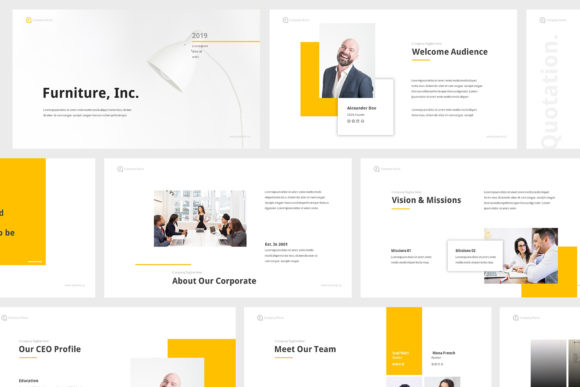
The Furniture Powerpoint Presentation contains thirty unique creative slides, each designed to support different stages of a presentation. You can use the slides for introductions, product highlights, comparison tables, pricing breakdowns, project timelines, or closing calls to action. The template comes in both PPTX and PPT formats, and it supports two aspect ratios: standard 16:9 and widescreen size. This flexibility means your presentation will look good on any screen, from laptops to projectors.
All slides are fully animated, providing smooth transitions that keep your audience engaged. The animations are not overly flashy; they are subtle and professional, helping you guide attention to key points. The template also includes overlay picture effects, which allow you to place images over colored backgrounds or gradients without manual editing. This feature is especially useful for furniture photography, where product images need to stand out without clashing with background colors.
Another important aspect is that the layout is based on master slides. This means you can change fonts, colors, or element positions across all slides at once, ensuring consistency throughout your deck. The resizable vector elements allow you to scale icons, shapes, and graphics without losing quality. For anyone who needs to update presentations regularly, these features save significant time.
Who Benefits from a Dedicated Furniture Presentation Template
Different users approach this template with varying priorities. Understanding which aspects matter most to you can help you decide if it fits your project.
Beginners and First-Time Presenters
If you are new to creating presentations or have limited design experience, the Furniture Powerpoint Presentation offers a straightforward starting point. The template includes documentation that guides you through inserting images, editing text, and applying animations. With one-click image insertion, you can drop your furniture photos directly into placeholders without adjusting sizes or positions. The use of free fonts like Droid Sans and Cabin means you do not need to purchase additional typefaces. For a beginner, the priority is often ease of use and speed. This template delivers both, allowing you to focus on preparing your speech rather than fiddling with slide layouts.
Marketing and Sales Professionals
For marketers and sales representatives, presentation quality directly affects client perception. The flat design elements used in this template create a clean, modern aesthetic that looks professional without being distracting. The pixel-perfect, progressive design ensures that every element aligns properly, even after editing. If you frequently present to retail buyers, interior designers, or homeowners, having a consistent visual identity across slides reinforces your brand. The template’s retina and full HD resolution means your images and text appear sharp on high-resolution displays, which is common in modern meetings.
Small Business Owners and Entrepreneurs
Running a furniture store, design studio, or e-commerce brand often means wearing multiple hats. You may not have a dedicated marketing team or graphic designer. The Furniture Powerpoint Presentation acts as a time-saving tool that lets you create professional decks on your own. With thirty slides, you can cover a full product catalog, seasonal promotions, or an annual business update. The commercial value here is clear: you invest a small one-time cost for a template, and you reuse it for every campaign. You can also customize it for different audiences, such as wholesale partners versus retail customers.
Educators and Trainers
If you teach interior design, furniture sales, or visual merchandising, this template can serve as a teaching aid. The structured slides help you present concepts step by step, from theory to practical applications. You can use the overlay picture effect to compare before-and-after room setups, or highlight specific furniture features using vector graphics. The fully animated slides can make classroom sessions more dynamic without requiring you to build animations from scratch. The learning value extends to students as well, who can see how professional templates are organized.
Freelancers and Creative Professionals
Freelance interior designers, visualizers, and creative directors often need to present portfolios or project proposals. The Furniture Powerpoint Presentation provides a coherent framework for showcasing your work. The resizable vector elements let you add custom illustrations or icons that match your personal style. The free updates included with the template ensure you have access to any improvements or new features. For a creator, the priority is often flexibility and quality. This template offers a balance between structure and customization, so you are not locked into a rigid layout.
Practical Considerations for Different Workflows
Every user type approaches the template with different needs. Here are some practical scenarios that illustrate how the template might be used.
For a furniture retailer launching a new collection: Start with a brand introduction slide, then use product highlight slides with overlay picture effects to feature five to ten key items. Add a comparison table slide to show dimensions, materials, and pricing. Finish with a call-to-action slide that invites orders or store visits. The animated transitions keep the presentation flowing during a sales meeting.
For an interior design student preparing a final project: Use the widescreen aspect ratio to match modern display standards. Insert mood board images, floor plans, and material swatches into the picture placeholders. The master slide layout ensures that your title and page numbers remain consistent. You can add text explanations using the free fonts, and the documentation helps you understand how to structure your content.
For a marketing agency pitching to a furniture brand: Customize the color scheme to match the brand’s identity by editing the master slides. Use the fully animated slides to reveal campaign strategies step by step. The resizable vector elements allow you to add charts or icons that represent the target market. The pixel-perfect design gives a polished impression that supports your credibility.
Key Features That Support Different Priorities
When evaluating whether this template matches your goals, consider the following features and how they relate to your priorities.
- Ease of use: One-click image insertion, documentation, and master slide layouts make this template beginner-friendly. If you want to create a presentation quickly without learning complex software, this feature matters most.
- Quality: Retina and full HD resolution, pixel-perfect design, and progressive layouts ensure high visual output. Professionals who present on large screens or high-resolution monitors will appreciate this.
- Flexibility: Two aspect ratios, resizable vector elements, and overlay picture effects allow you to adapt the template to different content. Creators and educators often need this flexibility to cover varied topics.
- Speed: With pre-animated slides and editable placeholders, you can prepare a complete presentation in a fraction of the time it would take to build from scratch. Business owners and marketers benefit from this efficiency.
- Cost: The template includes free fonts, free updates, and print-ready files, reducing additional expenses. For budget-conscious users, this represents good commercial value.
- Long-term usefulness: Since you can edit colors, fonts, and elements via master slides, the template can be reused for multiple projects. This appeals to anyone who creates presentations regularly.
Evaluating If This Template Matches Your Needs
To decide if the Furniture Powerpoint Presentation is right for you, think about your project type and skill level. If you need a presentation for a one-time event and have no design experience, this template will work because it provides everything pre-made. If you are an experienced user who wants full control over every detail, the master slides and vector elements still give you that control, while saving you from starting from a blank file.
Consider the nature of your content. This template is optimized for furniture and interior design related topics. If your presentation covers abstract business strategies or unrelated industries, the flat design aesthetic might still work, but the overlay picture effects and vectors are tailored to visual product showcases. For those who want to present furniture photography, room layouts, or product specifications, the template directly addresses those needs.
Also, think about your audience. If you presenter to clients who expect high-quality visuals, the pixel-perfect design and full animations will meet those expectations. If you are presenting internally to colleagues who prioritize data, you can still use the clean layouts to present information clearly. The template does not force you into a specific narrative; it provides structure that you can fill with your own message.
In terms of long-term value, the free updates ensure that the template remains compatible with future versions of presentation software. The print-ready option means you can also create handouts or brochures from the same design. For someone who builds a library of reusable templates, this is a practical addition.
Ultimately, the Furniture Powerpoint Presentation is a tool that reduces the gap between having an idea and presenting it professionally. It supports a wide range of users by offering a balance of simplicity and depth. Whether you are preparing for a small client meeting or a large trade show, the template helps you communicate your furniture-related message with clarity and style.